Stop the limiter from killing your track’s energy 🔥
 ReOrder
·Nov 17, 2025
·2 min read
ReOrder
·Nov 17, 2025
·2 min read
Ever spent hours perfecting a driving, groovy progressive trance track only to watch it lose all its energy the moment you slap on a limiter? You’re not alone – and there’s a surprisingly simple fix that most producers overlook.
🎛️ The Clipping Secret That Saves Your Dynamics
Here’s the issue: Those sharp transients in your percussive and plucky sounds create massive peak-to-average ratios. When your limiter hits those peaks, it squashes everything, killing your track’s drive.
The solution? Strategic clipping BEFORE your limiter.
Quick Ableton Fix:
• Load up Saturator on your problem channels
• Set it to Digital Clip and Hard Clip, turn off color
• Add 6dB of drive, then reduce output by 6dB
• Watch those transient spikes get tamed
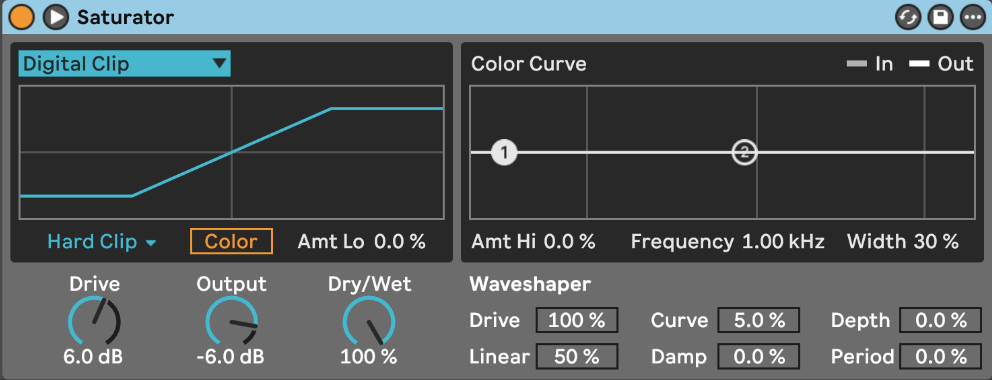
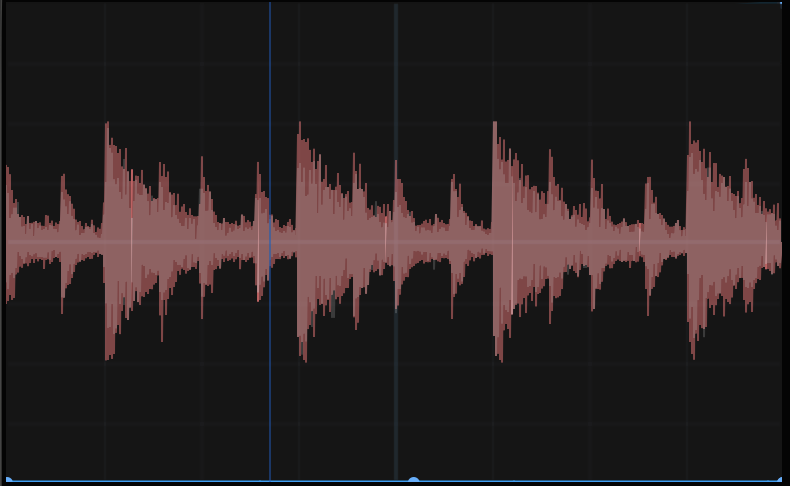
Pro tip: Use a visualizer like LFO Tool (Yes it has visualizer inside) to see the peaks getting controlled. Be gentle – too much clipping destroys character, but just enough removes those limiter-triggering spikes without audible distortion.
See the waveform and especially the transients before and after Clipping Is applied!
BEFORE CLIPPER

BEFORE CLIPPER
Your Action Step:
Before your next mixdown, try clipping those aggressive transients by 3-6dB on your hats, plucks, and percussive elements. Then apply your limiter and hear the difference in dynamics.
Keep creating,
ReOrder
P.S. Want to learn more techniques like these? Check out my free video on making track start to finish!